

Business Wi-Fi. Working smarter.
How BizWorx works.
Your business has a lot of moving parts. Your network should help keep them moving.
BizWorx is BBT’s managed business network solution. It brings separate networks for payments, staff, customers and business operations together with security tools and simple app-based control.

Built around your workday
One business.
Different connection needs.
Your register is processing a sale. An employee is checking inventory. A customer is using Wi-Fi while they wait. Each needs a connection, but they do not need the same access.
BizWorx helps organize those connections so you can manage who belongs where. For a shop in Alpine, a café in Marfa or an office serving the Big Bend region, that means a clearer way to manage the technology behind the work.
01 / Separate by purpose
A place for every connection.
Your payments, team, customers and business operations have different needs. Select a network to see how BizWorx brings them together while keeping access separate.

Payment network
Keep checkout in its own lane.
A dedicated point-of-sale network separates payment devices from guest and staff connections. Properly configured isolation helps limit access to payment systems.
Picture your lunch rush: Customers can connect to guest Wi-Fi without being placed on the network used by your register.

Staff network
Give your team the access they need.
Staff profiles and individual passwords make employee access easier to manage. Remove a departing employee’s profile without changing everyone else’s credentials.
Picture a staffing change: Update that person’s access instead of passing around another shared password.

Customer network
Make every connection a warm welcome.
Offer separate guest Wi-Fi with a customizable welcome page. Customer portal options can collect contact information and show usage insights.
Picture your waiting area: Visitors get a convenient connection while your business devices stay on their own network.
Explain any customer data collection and obtain appropriate marketing consent.

Primary network
Connect the work behind the counter.
Keep business operations separate from employee and guest connections, with wired and wireless device management.
Picture the back office: Your scheduling computer and business tools have a designated place to connect, rather than sharing the guest password.
Network assignments and access rules should match your devices and payment provider’s requirements. Separate Wi-Fi names alone do not establish PCI compliance.
02 / More control, less guesswork
Tools that earn their place
in your workday.
Manage from your phone
Use the CommandWorx app to view connected devices, manage network access and check activity without standing beside the router.
Add a layer of protection
Network security tools help block malicious traffic and online threats. Content controls help you set appropriate boundaries for network use.
See what is connected
Device visibility and usage information help you understand your network and spot connections that deserve a closer look.
Make guest Wi-Fi yours
A branded customer portal gives visitors a recognizable welcome. Guest access stays separate from the connections used to run the business.
Stay connected through an Internet outage
BBT BizWorx offers backup connectivity that can automatically take over when your primary Internet connection goes down, helping keep essential business devices online. A configured, available backup connection and power are required.
Get local help
Work with BBT to discuss coverage, device needs and network setup, with support from a team serving the Big Bend region.
Compatible BBT equipment is required. Available features depend on your service and configuration. Ask BBT about equipment, setup and service costs.
Backup that means business
Your Internet goes down.
Your work can keep going.
An Internet interruption should not have to bring your business to a standstill.
BBT BizWorx offers a backup connection option that can automatically take over if your primary Internet service is interrupted. It helps keep essential connections available while your main connection is down.
Build a backup plan before you need it.
Talk with BBT about keeping your checkout and other essential devices connected, which backup option fits your location, and the equipment and service needed.
Ask about BizWorx backupRequires a configured, working backup connection and power to your network and devices. A power outage requires a separate power-backup solution. Coverage, capacity and equipment affect availability; uninterrupted service and payment processing are not guaranteed. Ask BBT about setup and additional costs.

03 / Understand the payment connection
A smooth checkout starts before the card is tapped.
A payment terminal is only one part of the transaction. Your network, payment provider and security practices all have a role.
BizWorx helps with the network side: organizing connections, separating access and making the network easier to manage.
When a payment will not go through
A weak or disconnected network can interrupt a sale. But a declined card may also involve the card issuer or payment processor. Start by identifying whether the terminal has a connection, then follow your provider’s troubleshooting steps. A better network cannot fix every declined transaction.
When the connection goes down
Do you know how your checkout will operate during an outage? Some payment systems offer offline transactions, but availability, upload deadlines and financial risk vary. A payment accepted offline can later be declined. Confirm your processor’s rules and discuss a backup connection with BBT before you need it.
When one password opens too many doors
Sharing one network among visitors, staff devices and payment equipment makes access harder to control. Effective network segmentation can help isolate the cardholder data environment and may reduce PCI assessment scope. That separation must be configured and verified, not assumed from different Wi-Fi names.
Texas law + payment security
Is POS network encryption required by Texas law?
The accurate answer needs a distinction. Texas Business & Commerce Code §521.052 requires businesses to maintain reasonable procedures to protect sensitive personal information from unlawful use or disclosure. It does not state a blanket rule that every POS network must be encrypted.
PCI DSS sets more specific payment-security requirements. These include strong encryption for cardholder data sent across open, public networks, and strong cryptography for authentication and transmission on wireless networks that transmit card numbers or connect to the cardholder data environment.
PCI DSS is an industry standard, distinct from Texas law. Your payment provider or acquiring bank can confirm the validation requirements that apply to your business. See sources below.
Where BizWorx fits
BizWorx gives you a practical way to separate payment devices from other users and manage the network supporting them. It complements your payment provider’s security measures. It does not replace them or automatically make your business PCI compliant.
Keep payment devices updated, follow your provider’s guidance, check terminals for tampering and confirm how payment data is encrypted. A Wi-Fi password alone is not proof that every part of a transaction is protected.
04 / A conversation with a local team
Tell us how your
business works.
Start with what happens on a normal day: where customers gather, where your team works and where you take payments. Then consider busy periods, coverage gaps and what needs to stay connected during an interruption.
Bring your payment provider’s network requirements. BBT can help discuss the network side of that plan.
Need business phone service, too? Ask BBT about business voice and PBX options alongside your network service.
Let’s talk about your setup

A few useful answers
Before you connect.
Is BizWorx a payment processor?
No. BizWorx manages the business network that connects your devices. Your payment processor continues to handle your card transactions and payment service.
Can I keep my current payment system?
Discuss your terminal and processor’s network requirements with BBT before changing your setup. Compatibility depends on the equipment and configuration; do not assume every payment system has identical needs.
Does a separate POS network make me PCI compliant?
No. Effective segmentation can support your security plan, but compliance also involves payment devices, data handling, access controls, ongoing practices and applicable validation. Confirm requirements with your acquiring bank or payment provider.
Can guests use Wi-Fi without joining the payment network?
Yes. BizWorx supports separate customer and point-of-sale networks. Have the isolation and access rules configured appropriately for your business.
How does BizWorx backup work during an outage?
BBT BizWorx offers backup connectivity that can automatically take over when your primary Internet connection fails. The backup connection must be configured and available, and your network equipment and devices must have power. An Internet backup does not supply electricity during a power outage. Ask BBT about compatible backup options, equipment and service costs for your location.
What should I have ready when I call?
Your business address, approximate space and coverage needs, number and types of devices, current Internet setup, and your payment provider’s network requirements. Mention any business phone or backup needs, too.
BBT BizWorx
A network that makes
sense for your business.
Tell us what you need to connect. We’ll help you explore the right setup.
Download our Bizworx App
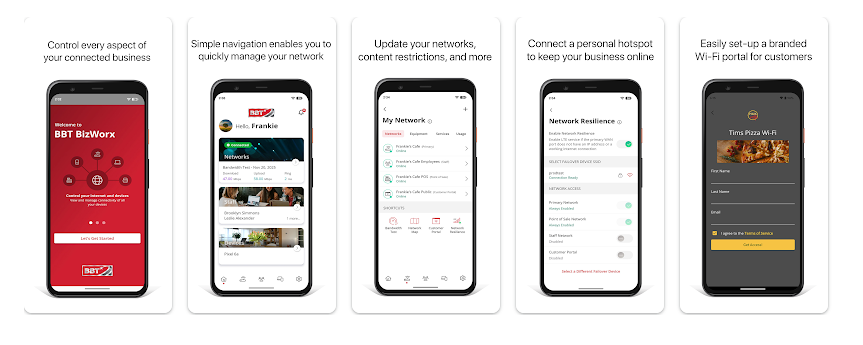
Bizworx provides a wide range of options for managing your business network and daily operations from anywhere.
-
Manage Staff Access
- Create Guest & POS Networks
- Monitor Network Activity
- Enhance Security & Controls
**Bizworx Network Management requires a compatible BBT Business router.
For assistance on registering your account, call 1.800.592.4781
Download it on:


With BizWorx, You’re in Control of Four Simple, Powerful Connections:
Business Core
Keep your most important operations running on a private, secure line that protects your business and keeps it moving, even during disruptions.
Team Wi-Fi
Give your employees the bandwidth they need to get work done without slowing down your critical systems. Update access as your team grows.

Payments Made Safe
Run checkouts, mobile payments, and registers on their own protected connection — so transactions stay fast, smooth, and secure.

Customer Wi-Fi
Offer guests a safe and simple way online while showcasing your brand. Set the hours, rules, and look to match your business style.

BizWorx Fits the Way You Do Business
No matter what kind of work you do here in Far West Texas, BizWorx can help you run it better. Our Wi-Fi solutions are built for local businesses like yours — simple to manage, secure, and designed to give both you and your customers a better experience.
Hospitality
Keep hotel guests streaming and restaurant customers connected with Wi-Fi that works seamlessly, from check-in to check-out.

Retail
Give shoppers smooth, reliable online access that enhances every visit, builds loyalty, and encourages them to return more often.

Professional Services
From clinics to offices, create secure, dependable networks that protect sensitive information and support your team’s daily work.

Manufacturing & Trade
Boost efficiency with reliable, managed Wi-Fi that supports your operations, equipment, employees, and business productivity every day.

BizWorx Tutorial Videos
An Introduction to Commandworx
Learn about the Settings Menu
Find Network Devices
Change Your Network Name
Share your Network
Setup Network Resilience
Learn about Alerts
Setup the Customer Portal
Setup Staff Management
Setup Content Restrictions
